
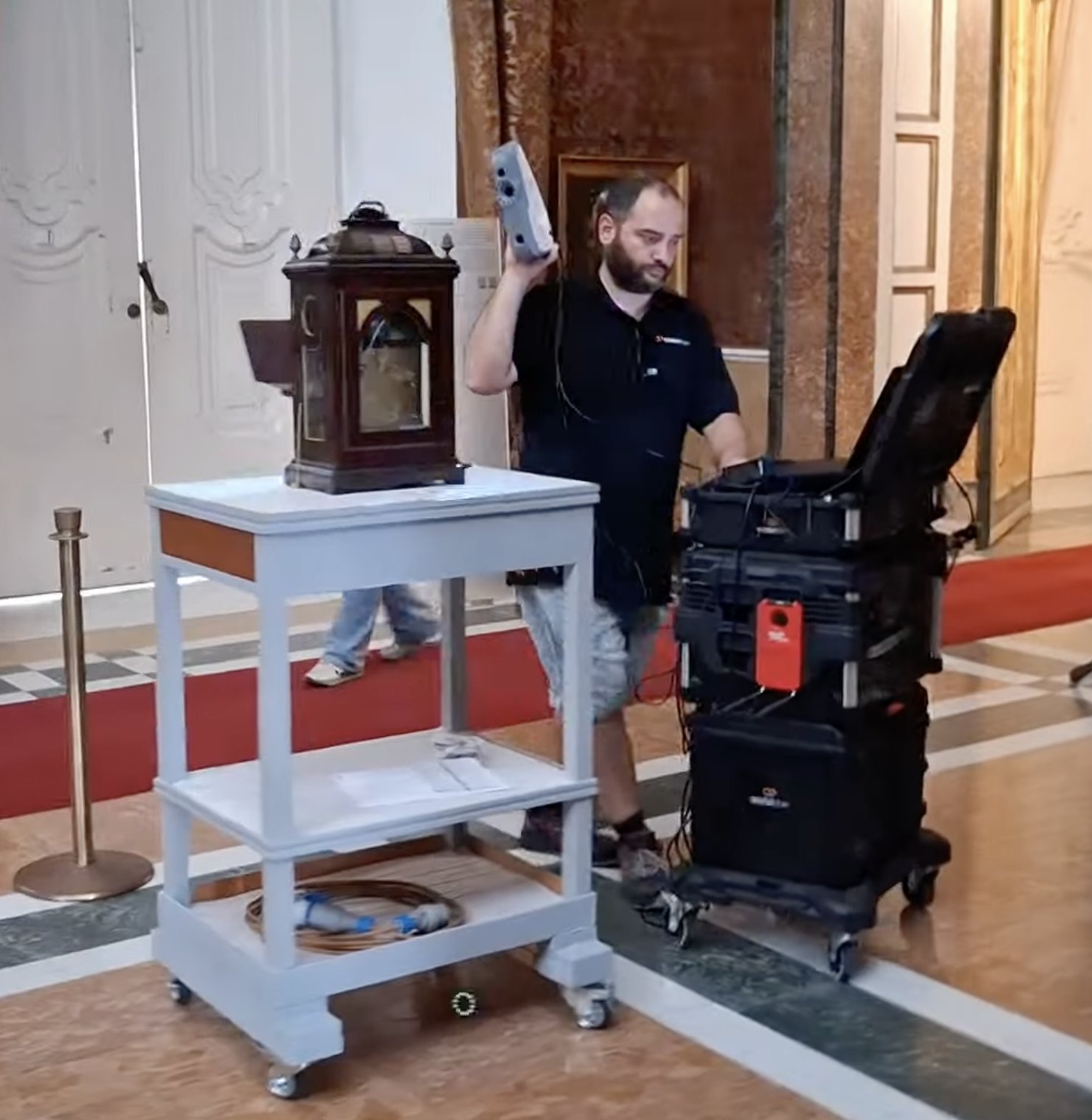
This is a technical note on how a digitization site is run on an art collection with the AerariumChain kit, the Site Manager and Scan applications and the HUB: what is decided before the first scan, how the site is set up, how data is recorded, captured, notarized, uploaded, processed, checked and delivered. It is written against the guidelines of the Italian Ministry of Culture and its Digital Library, the European framework and the main United States and international references, all listed at the end. In February 2025 we submitted our contribution to the public consultation opened by the Digital Library on the guidelines for the 3D digitization of historic-artistic and museum heritage, and the procedures described here are the ones we brought to that table.
The reference framework, in short
Italy has a complete and recent set of documents. The Piano nazionale di digitalizzazione del patrimonio culturale (PND, version 1.1, 2023) is the strategic frame. Its Annex 1, the Linee guida per la digitalizzazione del patrimonio culturale (version 1.0, June 2022), describes the digitization project through six questions (why, what, who, how, when, where), then the file formats, the RAW master, the METS metadata standard, rights, naming conventions and acceptance testing by work progress. The technical appendix Linee guida per la digitalizzazione 3D di beni storico-artistici e museali, drafted by the Digital Library with the CNR institutes ISPC and ISTI and put to public consultation between December 2024 and May 2025, is the document that speaks most directly to a scanning site: it defines the documentary approach, the distinction between raw data, master model and derived models, the minimum resolution as a function of object size, accuracy, texture resolution, the layout of the site, the structured documentation of setups and processing, the delivery dataset and the lifecycle of the 3D resource. Delivery to the Digital Library follows the I.PaC cooperation guidelines and the METS ECO-MiC profile. Cataloguing follows the ICCD standards; the way the HUB handles it with the Catalog function is the subject of a separate article.
At European level, Commission Recommendation (EU) 2021/1970 asks Member States to digitize in 3D all monuments and sites at risk and half of the most visited ones by 2030. Two practical documents came out of it: the Commission's study on quality in 3D digitisation (VIGIE 2020/654, 2022), which separates the complexity of the acquisition from the quality of the result, and the EUreka3D guide 3D Digitisation Guidelines: Steps to Success (2024), a seventeen-step checklist from project plan to archive. In the United States the reference for still images is the FADGI Technical Guidelines for Digitizing Cultural Heritage Materials (third edition, May 2023), with four performance levels measured on test targets for tone, colour accuracy, resolution, noise and uniformity, and a category dedicated to paintings and other two-dimensional art. Conservation photography follows the AIC Guide to Digital Photography and Conservation Documentation (third edition, 2017). For 3D, the Smithsonian's Digitization Program Office has set the practice with its open tools and its 3D metadata model, and Cultural Heritage Imaging with its photogrammetry and RTI methods and the Digital Lab Notebook for process documentation. Across borders the shared references are ISO/TS 19264-1 for image quality analysis, the Metamorfoze guidelines, the London Charter and the Seville Principles for documentation and paradata, IIIF for interoperable images, CIDOC CRM for the semantic model, and the British Museum manual for multispectral imaging.
Three points recur in all of them, and they are the backbone of our procedures:
- The purpose comes first. It decides resolution, accuracy, what is captured and what is delivered.
- Raw data, master and derivatives are kept apart. The master is the faithful, neutral record at the highest resolution and is never edited for taste; every specialized output is a derivative.
- The process is documented as structured paradata (setups, instruments, parameters, steps), written while the work is done, not afterwards.
The phases at a glance
- Preparation of the works and definition of the purpose.
- Site setup: fixed and mobile configurations.
- Site records with the Site Manager app: setups, survey forms, checklists.
- Capture with the AerariumChain Scan app: identification of the work, 3D scan, gigapixel photography, multispectral imaging, association with the catalogue record.
- Packaging, notarization and upload of every acquisition set, in real time or in batch.
- Processing workflows: the automatic 3D pipeline and Gigapixel Studio on the HUB, with master TIFFs and tiles for the viewer.
- Quality control and approval.
- Packaging and delivery in specific formats, for example DPAC for the Digital Library of the Ministry of Culture, with METS files and derivatives.
- Availability of the data: the HUB, the viewer, the derivatives and the store applications.
Each phase is described below.
1. Preparation of the works: the purpose decides everything
Before any work is moved, the purpose of the digitization is written down, because it fixes the parameters of everything that follows. We distinguish three purposes.
| Purpose | What is captured | What it implies on site |
|---|---|---|
| Record of the conservation state | The work as it is on the day: geometry, surface and spectral layers, before any intervention | Dusting only; the highest resolution the object requires; a repeatable setup, so that the next capture can be compared with this one |
| Pre-restoration and post-restoration | The work before the intervention, then after it | Same setup and parameters in both sessions; link to the restoration record; the twin before restoration stays as a version |
| Content generation (catalogues, exhibitions, press) | The work as it is to be shown | Derivatives from the master: colour-managed plates, renders, 3D prints; any retouching happens on the derivative, never on the work |
We concentrate on the first case, because it documents the works as they are and not after the maquillage. Within it the practical cases are three:
- Scanning for catalogues or exhibitions. The record of condition is taken at the same time as the material for the publication; the publication uses derivatives, the record stays untouched.
- Scanning before and after a restoration. Two sessions with the same setup and the same parameters, so that the two twins can be compared point by point and the restoration record is linked to both, as the PND Annex 1, Linee guida per la digitalizzazione del patrimonio culturale, asks in section 2.5.1, Digitalizzazione e restauro.
- Continuous scanning over time. The work is captured at intervals, and each capture is compared with the previous one to detect signals of degradation or to follow the evolution of its condition. This is the digital twin of the work in the proper sense: a record that grows, not a photograph taken once.
Continuous scanning is applied both to the monitoring of the collection, in store and on display, and to exhibitions, where it is the basis of condition reporting at arrival and at departure. In all three cases the only preparation of the work is dusting by the restorer. No cleaning, no consolidation, no removal of old retouching: whatever is on the surface on the day of the capture is part of the record.
Handling is the bottleneck
The single factor that decides whether a campaign ends is how much handling it asks for. If the works have to be moved, prepared, handled and transported for every capture, the campaign never ends: each work waits for the handlers, for the restorer, for a free slot in the lift and a free hour in the store. Planning therefore starts from handling, not from the scanner:
- Group what has to be moved. The works that really need to be moved (to a fixed station, out of a frame, down from a wall) are grouped by location and by typology, so that the handlers' team works in a few concentrated sessions rather than on call for months.
- Bring the site to the works. Fixed or mobile proximity sites are placed next to the cluster being digitized, so that most works travel a few metres or do not travel at all.
- Capture within the daily activity. Whatever is accessible is captured during the ordinary life of the museum: works on display, and works in the store at the moment they are taken out for a loan, a study or a condition check.
- Integrate when possible, otherwise capture what is accessible. The state recorded in the daily captures is completed with fuller sessions when a work comes down; when it does not, the accessible parts are captured anyway and the twin states what is missing. A partial capture today is worth more than a complete capture that never happens.
- Reduce the dependence on handlers and restorers. Both remain necessary for the few operations that require them, but the bulk of the operations must require no handling of the works at all. If it does, the campaign stops.
The guidelines say the same, in their own terms. The PND 3D appendix, Linee guida per la digitalizzazione 3D di beni storico-artistici e museali, section 2.3, places the complexity of access (Complessità di Accesso) beside geometry and material as one of the three families of difficulty of a campaign, and defines it as the logistical and conservation problems "linked to access, handling and movement of the object". It notes that many movable objects are not in fact movable, and that where an object cannot be moved, or can only partly be moved, "working times grow longer, because moving the acquisition instruments is slower and harder than moving the pieces in front of a fixed setup"; among its complexity indices it lists the object that may be handled only by authorised or specialised personnel and the object that needs specific equipment to be moved or supported. Its answer is organisational: such complexities are "amortised" when a dedicated station, specialised handling staff or special equipment serve many objects at once, and the operating circumstances must be assessed "in relation to the whole collection" covered by the campaign. On the site itself, section 3.1 requires the handling area and the acquisition area to be in the same room or immediately adjacent, "to limit the movement of the works". The PND Annex 1, Linee guida per la digitalizzazione del patrimonio culturale, section 2.2, requires that every direct operation on the works, digitization included, be authorised by the competent authority and carried out by qualified personnel, and that the condition of each work be documented beforehand; section 2.3 lists handling, "taking and repositioning the material", among the most relevant activities of a project and assigns it to the restorer, who sets the restrictions on movement, and to the logistics officer. The EUreka3D guide, for its part, puts the site visit and the assessment of the objects and of their complexity among the first steps of the plan, before any equipment is chosen. In other words, the guidelines themselves make handling the scarce resource of a campaign. Grouping, proximity sites, capture within the daily activity and partial captures are how we keep that resource for the few operations that truly need it.
Preparation checklist
- Identifier. Every work carries a unique identifier before it is scanned (inventory number, catalogue number, NCT). The PND Annex 1, Linee guida per la digitalizzazione del patrimonio culturale, section 2.5.2, is explicit: digitizing works that are not identified and described is strongly discouraged, and a label with a barcode or QR code can be applied where the support allows it.
- Target resolution. Set from the size of the object and from the smallest detail to record. The PND 3D appendix, Linee guida per la digitalizzazione 3D di beni storico-artistici e museali, section 2.1.3, gives a minimum resolution per bounding-box diagonal (0.05 mm under 3 cm, 0.65 to 0.85 mm between 30 and 60 cm, 1 to 1.5 mm between 100 and 200 cm, 1.5 mm above) and two rules: the resolution must be at most a quarter of the smallest detail to be measured, and the accuracy at least half the resolution. For the surface, the resolution on the work is stated in pixels per inch and planned by the Scan app.
- Surface treatment: none. Sprays, powders and targets applied to the surface are excluded for works of art. The Scan app records the treatment applied for every session, and for a work of art the value is always "none".
- Handling. Works are moved only by the museum's own staff or by its handlers. The operator never touches the work: every technique in the kit is non-contact and cold-light.
- Framing and glazing. Frames stay on unless the museum removes them; glazed works are captured through the glass only when removal is not allowed, and the survey form says so.
- Back and edges. If the back is accessible, it is captured in the same session; if the work is hung, the front is captured now and the back is added to the twin when the work comes down.
2. Site setup: fixed and mobile
The PND 3D appendix, Linee guida per la digitalizzazione 3D di beni storico-artistici e museali, section 3.1, describes the site as a set of digitization stations, each with its own acquisition setups, and ask that the place be chosen for control of natural light, enough room, adequate power, the possibility of isolating the stations outside working hours and the absence of vibration from the floor. They also ask that the site be divided into areas: a handling area where the works of the day are placed, an acquisition area where the setups are mounted, and a storage area for the instruments. Every setup must be documented. Within this frame we distinguish two families of setup, and a campaign, even a continuous one, has to balance them.
| Fixed setup | Mobile setup (the kit cart) | |
|---|---|---|
| Typical configuration | Turntable for photogrammetry; structured-light or pulsed-light scanner on a robotic arm; fixed lights and camera; or the kit itself on a prepared table, moved less often than a mobile site | Cart with structured-light scanners, medium-format camera, calibrated lights, field computer, battery and 5G |
| Best suited to | Industrialized monitoring of an archive in store: many objects of similar size, captured again at intervals | Works on display, large or fragile works, works that cannot be moved, condition reporting in the exhibition hall |
| Where the work goes | The work goes to the station, through the handling area | The station goes to the work: capture in place, even hung on the wall |
| Throughput | High once tuned; sensitive to changes of size and to occlusions | Around 100 works a day with one operator, two to five minutes per work |
| What to document | The setup record once; the position of the station each time it is moved | The setup record once; the position of the cart and the lighting conditions for each session |
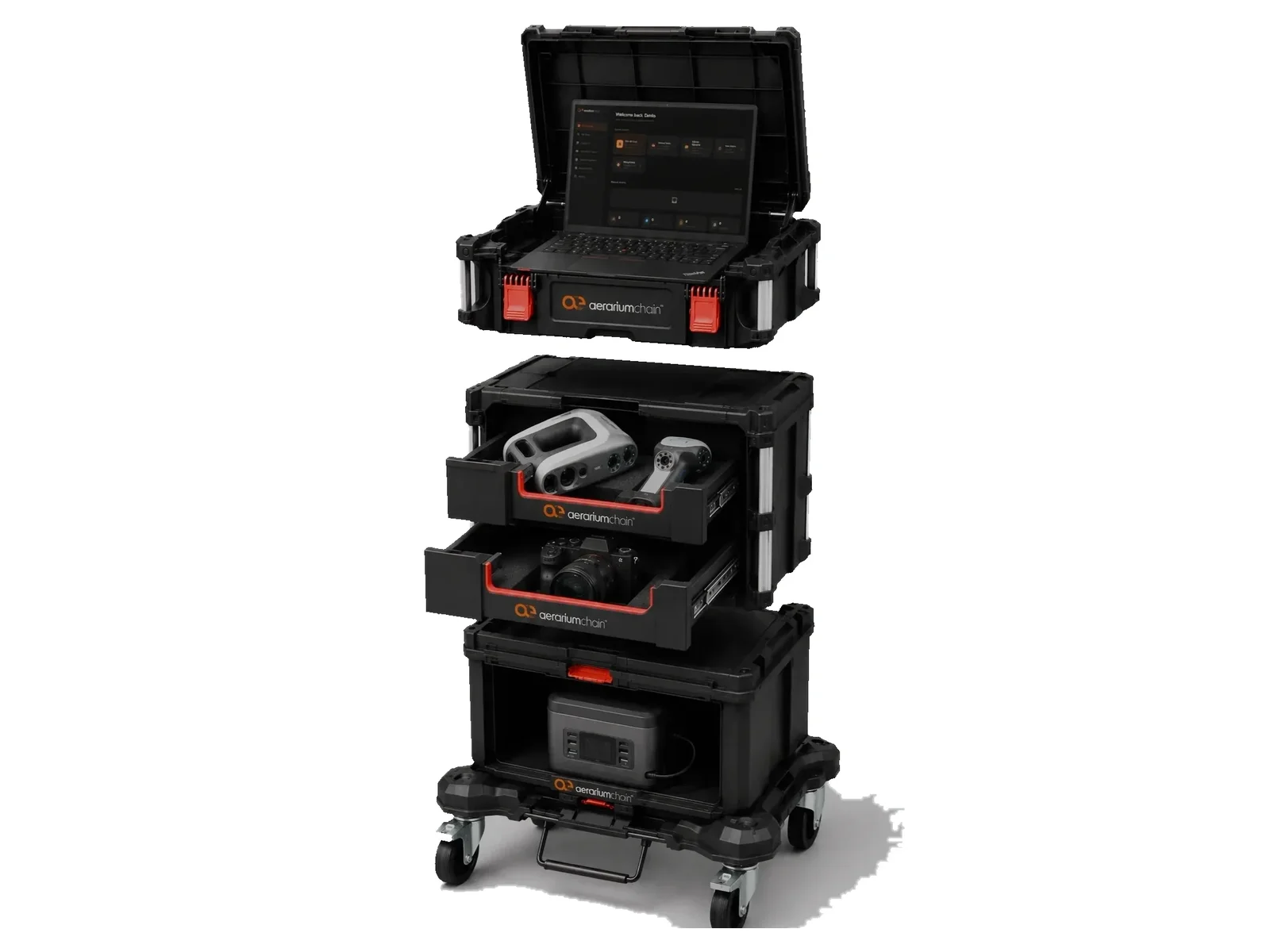
A fixed setup makes sense when the monitoring of an archive is industrialized: a turntable for photogrammetry, or a structured-light or pulsed-light scanner mounted on a robotic arm, which is more flexible across different sizes and occlusions. Our experience is that the gain of a fixed site comes from its flexibility rather than from its permanence. Thanks to the kit, the "fixed" site is mounted each time in a different area, as close as possible to the cluster of the archive being digitized, so that handling distances and times fall. The simplest form of this is the kit itself on a prepared table: the station is moved less often than a mobile site, but it is placed inside the store, next to the works of the day, so that the works travel a few metres instead of crossing the building. This reduces both the space and the time needed to transport the works to different points of the archive.
The mobile setup raises the daily capture capacity. The AerariumChain kit cart is designed and tested to move through the museum or the exhibition hall and to capture at the work, instead of bringing the work to the set. With one operator it reaches around a hundred works a day, two to five minutes per work. This goes with a capture philosophy: the work will be captured many times over the years. Rather than scanning it once every ten years, we capture the front frequently, leaving it hung on the wall, and we add the back to the twin when it becomes available.
A modular kit
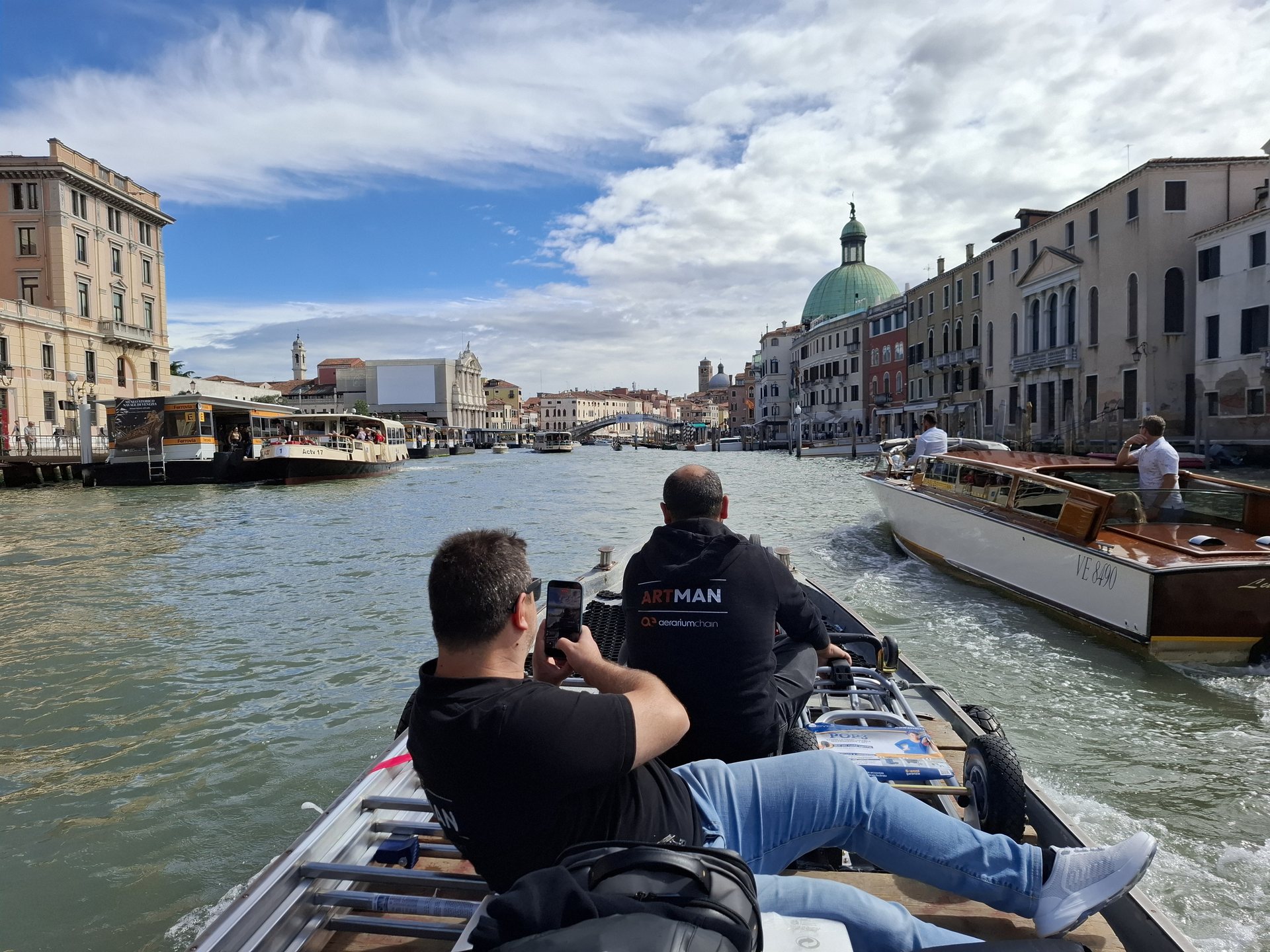
The cart is modular: it comes apart in a few minutes into frame, wheels and cases that one or two people carry by hand, and it is reassembled where the works are. This matters more often than it seems. Parts of a museum are reached only by stairs, with no lift large enough for a cart; many institutions have more than one site; and the archive is often not in the building where the works are shown. In all these cases the kit travels in pieces, up a staircase, in an ordinary car or on a boat, and the site is mounted on arrival. The same modularity lets a campaign take only the modules it needs.
Capturing while the museum is open
A mobile site must capture continuously, also while the public is present. The kit is designed for this: it needs little floor space, it moves quickly from one area to the next, there is nothing to move other than the cart itself, and it runs on its own battery, so there are no cables on the floor and no outlets to find. Capture then becomes part of the visit. Visitors stop, watch, ask questions, and the operator's answers are the best explanation of why the museum is documenting its works. The schedule follows the building: rooms with very narrow corridors or passages, where the cart would block the way, are planned on closing days, so that no room is closed to the public on account of the site.
Environmental conditions and the change of paradigm
The fundamental point of a mobile site is the environment. A station in a dark set with controlled light is the ideal; a gallery with many lights, reflections and changing daylight is the norm. Here the final purpose and the change of paradigm decide the procedure. The purpose is not laboratory perfection: it is the continuous acquisition of as much information as possible on the life of the work, for all the applications that the management and the promotion of the collection require. The work is captured continuously, not once. So:
- Mitigate the environmental noise as far as possible. Dim or switch off the nearby lights where the museum allows it, screen the work from direct sources, choose the time of day, use the kit's own calibrated lights as the dominant source and keep them in the same arrangement from one session to the next.
- Above all, eliminate the noise through repeated captures. A deviation introduced by the conditions of one day stands out against the series of captures of the same work and is recognised as noise, not as a change of the work; a change that persists across captures is a signal. The record of condition is a series, and the series is more robust than any single capture.
- Calibrate every session. The ColorChecker target in the frame, or the known colour of the scanner's own light, gives the reference against which the session is corrected, whatever the ambient light.
- Add laboratory masters to the twin's history when possible. When a work comes down for a loan, a restoration or a rehang, a capture in controlled conditions is added to the history of the twin as a reference master beside the gallery captures.
What the setup record contains
Each setup receives a name and a record, kept in Site Manager, which matches the setup sheet of the PND 3D appendix, Linee guida per la digitalizzazione 3D di beni storico-artistici e museali (section 3.6.1, Annex B, Relazione_Setup_Acquisizione): the environment and its dimensions, the lighting, each instrument with make, model, optics and filters and a link to its datasheet, the geometry of the capture, the calibration targets in use, the software and its version. The record is written once per setup, not once per work, and it is referenced by every session captured with it.
3. Site records: the Site Manager app
A campaign is, before anything else, a list of works and a discipline. AerariumChain Site Manager is the desktop application that keeps that discipline on site, on Windows and macOS, entirely offline, with automatic local safeguard copies; only sign-in and the final delivery need a connection. It records:
- The list of works, imported from the museum's spreadsheet through a guided column mapping, with the digitization checklist of each work: 3D required, gigapixel required, and what is already done (3D, gigapixel, photography, survey form). Filters, per-location views and live progress figures keep a campaign of thousands of pieces legible.
- The survey form of each work, with configurable defaults and automatic composition of the object identifier, exported to the official spreadsheet template used by the institutions. It carries the identifier, dimensions, materials and techniques, condition and location, the setup used, the instrument, the operator, the date, the treatment applied and the outputs produced.
- The acquisition setups, as named records; presets for the scanners fill the equipment fields of the survey form correctly every time.
- The packages: for each work a package with the metadata file, the survey form and the photographs, plus a master status workbook for the whole site and a report of changes. Packages follow the DPAC data format, so they are already shaped for preservation.
- Progress communications, generated from what changed since the last one.
When the site, or a part of it, is ready, Site Manager delivers it to the HUB: master workbook, survey forms, setups, photographs and the history of comments. Before sending, it shows how the delivery differs from what the HUB already holds, so the museum always knows whether it is creating or updating records. The site then appears in the HUB under Site Manager, and its works take their place in the Catalog.
4. Capture with the AerariumChain Scan app
AerariumChain Scan is the desktop application that conducts every capture session of the kit: it drives the scanner, the cameras and the lights, keeps each session in order, packages it and delivers it. It runs on Windows and macOS and is downloaded from the HUB, so the version on site is always the current one.
Identification of the work
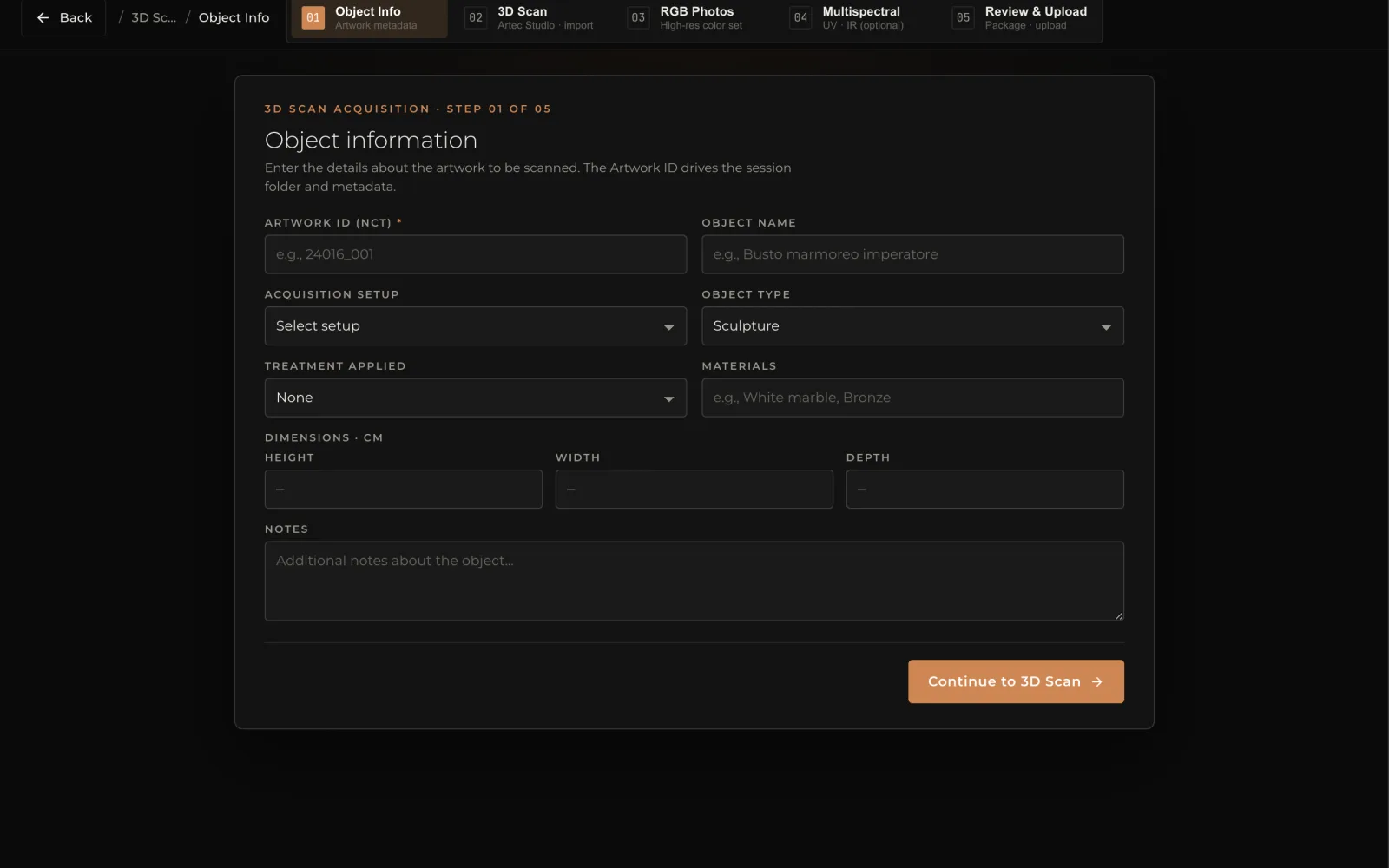
Every session opens with the identification of the work, which is what later ties the data to the catalogue record. The app offers three modes:
- Manual: the operator types the identifier (inventory number or NCT) and the app composes the session folder and the metadata from it.
- Semi-automatic: the identifier is chosen from the campaign list delivered by Site Manager, so that it matches the record and the checklist is updated.
- Automatic: where the works carry a machine-readable label, the app reads the identifier from the label and checks it against the list. In every mode the operator can still enter or correct the data by hand.
The same step records the acquisition setup in use, the object type, the materials, the dimensions and the treatment applied. The session is then tied to the record in the Catalog of the HUB (the association with the catalogue and the Catalog function are described in a separate article).
The three captures
| Capture | Instrument | What is recorded | Figures |
|---|---|---|---|
| The form: 3D scan | Handheld structured-light scanners, one for larger volumes and one for fine carving, or both together | Geometry and surface colour of sculpture, decorative arts, objects and frames | Geometry down to 0.05 mm; more than 300 million points per scan; two to five minutes per work |
| The surface: gigapixel photography | Medium-format camera, 102 megapixels, 120 mm macro lens, pixel-shift multi-shot, calibrated LED lights | Overlapping cells merged into one plate: craquelure, weave of the canvas, single brushstroke | 16 shots per cell into a 400-megapixel frame; plates of billions of pixels; colour verified as Delta E 2000 on a ColorChecker in every session |
| Beneath the surface: multispectral imaging | Infrared-converted medium-format body with a guided filter sequence | Underdrawings, pentimenti, old retouching and later interventions | Visible, infrared at 720 and 850 nm, ultraviolet; same framing as the visible plate |
For the 3D scan the app opens the session, launches the scanning software and watches the session folder; when the scan files appear, the session is marked and its technical metadata gathered automatically. The master keeps every gap left by surfaces the sensor could not reach: as the PND 3D appendix, Linee guida per la digitalizzazione 3D di beni storico-artistici e museali, requires in section 2.1.6, only holes much smaller than the chosen resolution may be closed in the master. Everything else stays visible, and is filled, if at all, in a derivative.
For gigapixel photography the operator chooses the mode (quick, guided, guided rotation, manual or freeform) and states the intended resolution on the work; the app computes the grid of shots from camera, lens and resolution, follows the progress cell by cell and checks that neighbouring cells overlap. Each cell is a 16-shot pixel-shift frame of 400 megapixels; the RAW files are kept as the master of the capture. Every session includes a ColorChecker target under the standard two-light arrangement at 45 degrees; the app measures colour accuracy patch by patch as Delta E 2000, verifies white balance and exposure, and files the colour report with the capture. This is the same logic FADGI applies to still images: performance measured on a target, not judged by eye.
Multispectral imaging uses an infrared-converted body and a guided filter sequence: visible, infrared reflectography at 720 and 850 nanometres, ultraviolet. The layers are shot with the same framing as the visible plate, so that they register with it and can be switched in the viewer.
5. Packaging, notarization and upload
Each acquisition set (a 3D session, a gigapixel capture, a multispectral sequence) is packaged in real time, at the end of the session, into a protected archive that contains the raw data, the technical metadata gathered by the app, the colour report and the checksum of every file. The package is then:
- Notarized. The fingerprint of the package and of its files is written to a public blockchain at capture: a certain timestamp and evidence that nothing was altered afterwards. This complements the standards of the Digital Library; it does not replace them.
- Uploaded. Deliveries are verified, protected and sent directly to secure cloud storage; the HUB registers each one and ties it to the right work.
| Upload mode | When | How |
|---|---|---|
| Real time | A fast connection is available on site (fibre, 5G) | Each package is uploaded as soon as it is closed, while scanning continues; processing starts at once |
| Deferred | The connection is slow or absent during capture | Packages are queued on the station and uploaded when a connection is available, with no action by the operator |
| Batch by external drive | Large sites with several capture stations, or no connection at all | Sessions are exported to a drive; the Drive Upload function of the app compares the drive with the HUB and uploads only what the HUB does not yet hold |
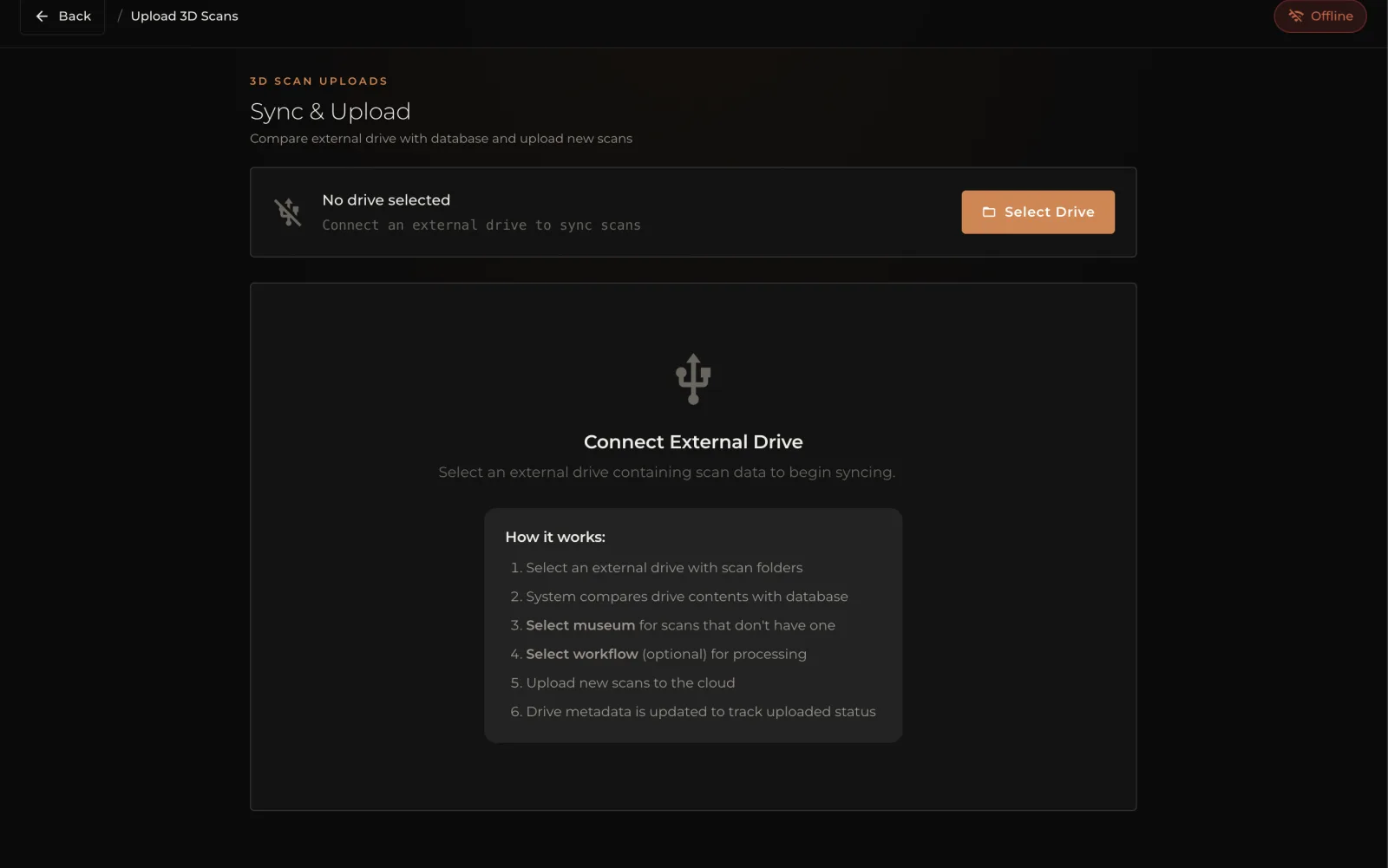
On large sites more than one station captures at once. The drive-based delivery collects the sessions of every machine, compares them with what the HUB already holds, and sends only what is missing: nothing is delivered twice, nothing is left behind.
Planning a campaign on your collection? We can go through these phases on your own works and spaces.
6. Processing workflows
A single day of capture produces terabytes of raw data. Without processing workflows that keep pace with the capture, a queue of data builds up that no one will ever work through. The second condition is quality: the workflows must create and update digital twins that serve many purposes at once, conservation, automatic and manual monitoring, inspection, and the generation of photographic and video derivatives good enough for catalogues and exhibitions. At this point the maquillage is done on the main derivative, never on the work.
3D: automatic
As soon as a 3D delivery is registered, the HUB's worker network takes over, with no technical staff required on the museum's side. Raw scanner sessions are resolved into finished meshes (registration, noise removal, meshing, normals, removal of redundancies), textured, converted into the form the viewer streams best and into working formats (OBJ, PLY, STL, GLB and OFF, with materials and textures), and prepared in several levels of detail with textures scaled to match. The master is kept at full resolution; every optimized version is a derivative with its own entry in the model's history. Processing starts as soon as the upload is registered, and within a few hours of the upload the scans can already appear on the HUB, ready to be opened in the viewer.
Gigapixel Studio
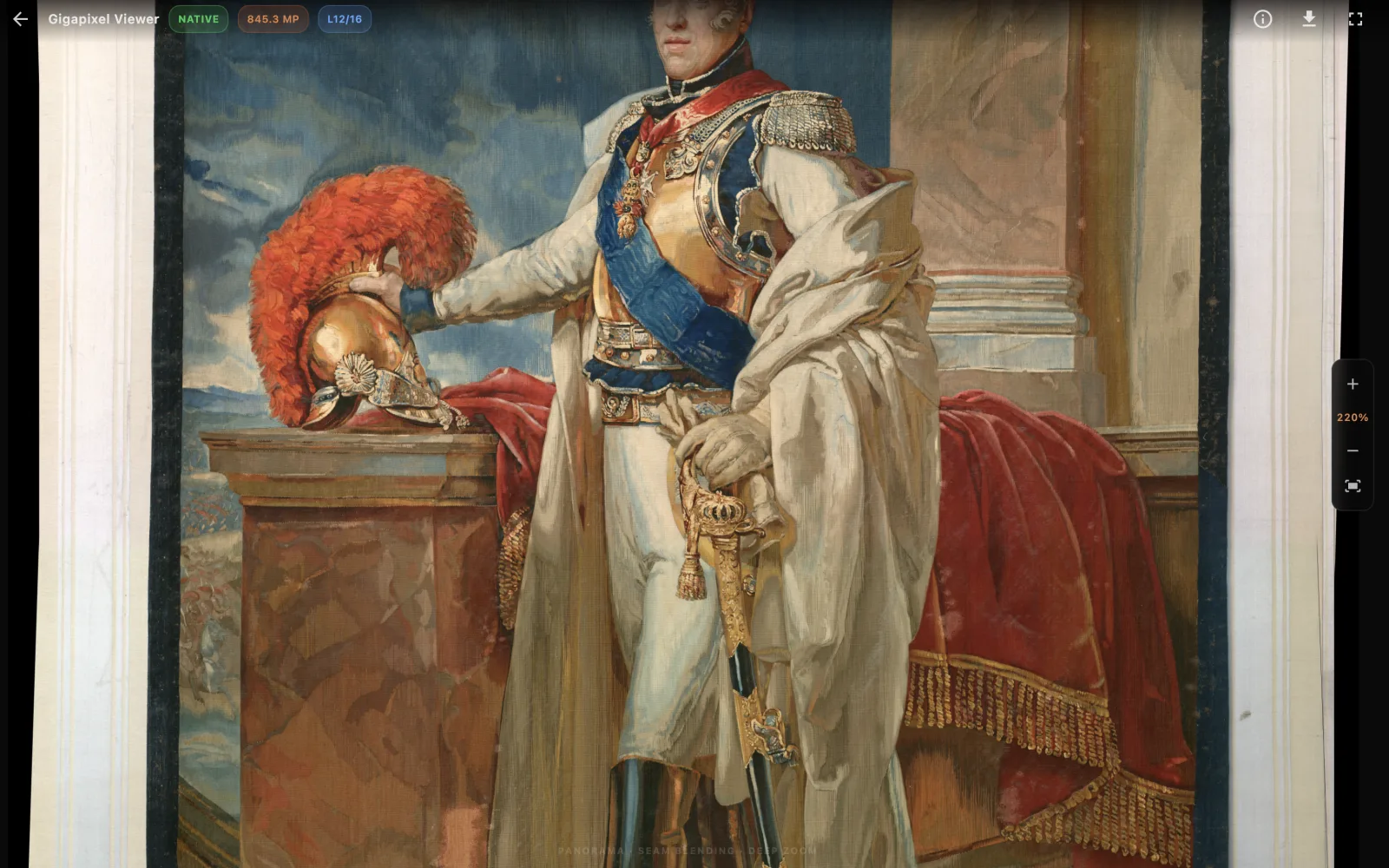
Gigapixel captures are processed in Gigapixel Studio, the gigapixel editor of the HUB, which lists every capture of the institution, from freshly delivered (raw cells) to finalized (plate ready), and proceeds through six steps:
- Collect. Review of the delivered cells, the overview shot and the ColorChecker reference of the session.
- Calibrate. The colour profile of the plate is built from the ColorChecker capture, so that the whole plate answers to a measured standard.
- Align. Neighbouring cells are matched automatically; a control-point editor allows fine correction where the surface demands it, with a preview of the adjustment.
- Refine. Capture sharpening is weighed cell by cell; candidates are compared and the best is retained.
- Preview. The assembled plate is inspected before anything is committed.
- Stitch. The final mosaic runs on the worker network and produces a 16-bit master TIFF, the archival plate, the TIFF derivatives a project requires, and the tiled pyramid the viewer streams. Publication is automatic.
Multispectral layers go through the same alignment against the visible plate and are attached to the work as layers. Where a plate was produced elsewhere, it can be deposited directly as a TIFF.
Technical metadata at ingestion
At ingestion the HUB verifies integrity and completeness, computes checksums, extracts the technical metadata of the capture (instrument, parameters, resolution, date) and attaches them to the resources. These are the data that later fill the technical and administrative sections of the METS, without any retyping.
7. Quality control and approval
The PND Annex 1, Linee guida per la digitalizzazione del patrimonio culturale, chapter 9 (Verifiche e collaudi), places acceptance testing in two moments: an initial technical sample (the prototype) and the acceptance by work progress, each with the parameters to test, the recording of anomalies and the verification of their resolution. The PND 3D appendix, Linee guida per la digitalizzazione 3D di beni storico-artistici e museali, adds a preliminary self-verification of the master by the operator (section 4.3.1). Our procedure follows the same pattern:
- Self-verification by the operator, on the HUB, against the targets fixed in phase 1: resolution with respect to the size of the object, accuracy, holes left visible, texture resolution, colour accuracy from the Delta E report, completeness of the session against the Site Manager checklist.
- Review by the museum and by the QA team in the streaming 3D viewer and in the Gigapixel viewer: rotate, zoom, mark OK or NOK with structured comments anchored to the surface. Approval takes hours, not weeks.
- Approval. Approved twins are versioned and their approval is recorded with its date and its author; a rejected capture goes back to the site with its comments.
8. Packaging and delivery in specific formats
The delivery dataset defined by the PND 3D appendix, Linee guida per la digitalizzazione 3D di beni storico-artistici e museali, section 4.2, is explicit: metadata of the digital object, master model, raw source data in interoperable and proprietary formats, derived models, report of the setups and acquisition processes, reports of the processing of master and derivatives, thumbnails and previews, results of the self-verification and a summary file, all under the unique code assigned by ICCD to the object. The applications of the HUB store assemble such packages for specific destinations.
For the Digital Library of the Ministry of Culture the application is DPAC (Digital Preservation and Access Console) by Ecomic, installed from the HUB store. It defines the DPAC catalogue template that the Catalog recognises natively; its Package Manager assembles the preservation packages from the digitized works, generates the METS file according to the ECO-MiC profile together with the required derivatives, deposits the packages in the Digital Library and notarizes them. The HUB follows each package (in deposit, deposited, notarized) and locks the packaged derivatives against deletion for as long as a package cites them. The heavy work of packaging runs on the worker network.
Other destinations are served the same way: export of masters and derivatives in open formats, plates and tiles for third-party viewers, and formats agreed case by case with the institution, since, as the same PND 3D appendix notes in section 2.1.6, no universal specification for derivatives exists.
9. Availability of the data: the HUB
A digitization site is only the beginning of the life of the data. What a museum needs afterwards is a system able to manage the catalogue and the evolution of its metadata, the data coming from the site, the capture and processing flows, the quality check and the processing of derivatives, and to give tools to the conservation department (comparison and monitoring), to curators and exhibitions (photographs, videos, interactive totems, ad hoc formats for third parties, 3D prints of different kinds according to purpose). The point where most systems stop is practical: opening a file of several gigabytes on any device, annotating on a very large 3D model, starting a render automatically to obtain the content required.
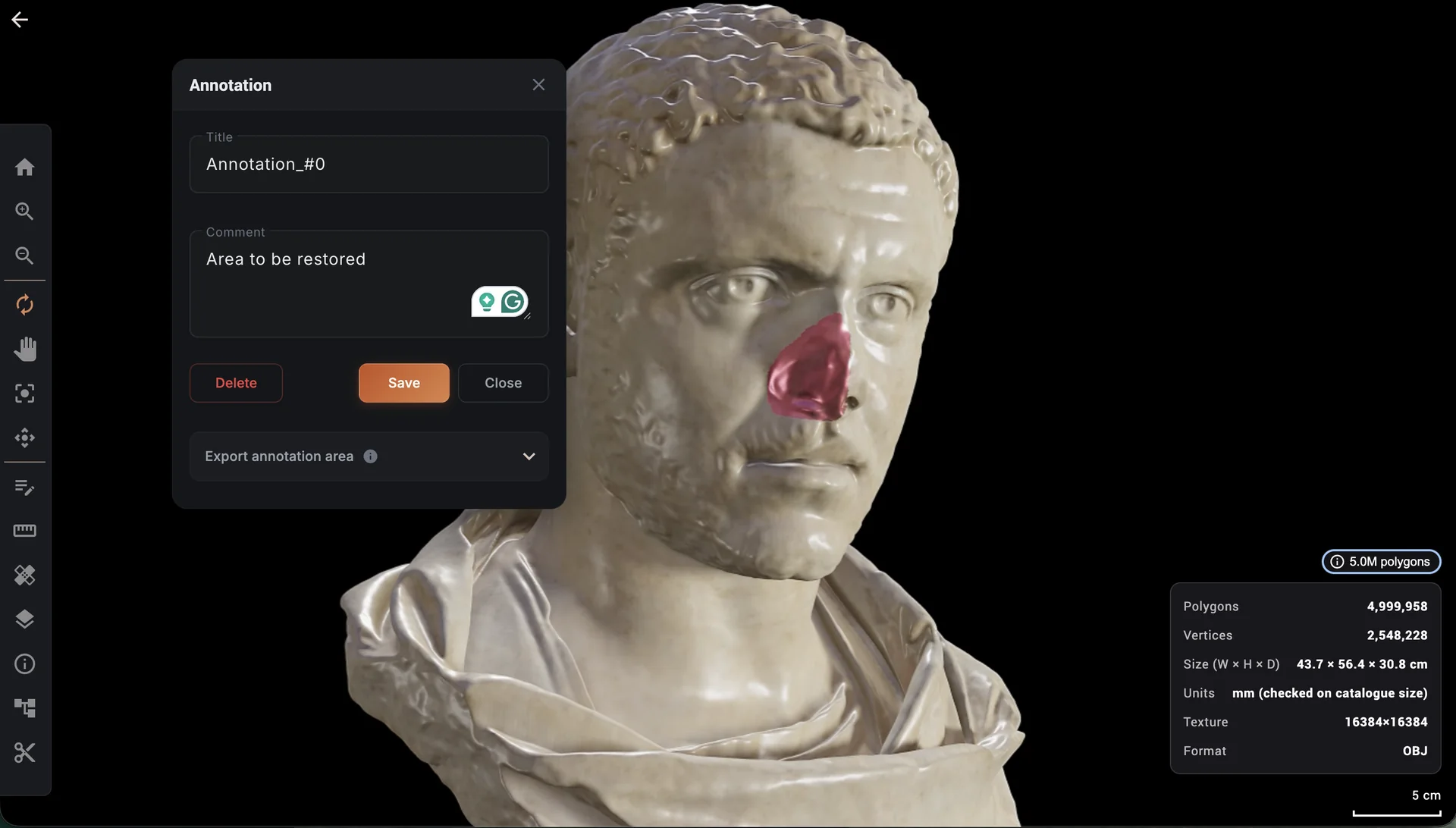
The HUB of AerariumChain joins all of these in one workflow, from the first scan to the derivative, without ever leaving the museum alone. The viewer renders in the cloud and streams only the image, so a full-resolution model or a plate of hundreds of gigapixels opens at once in an ordinary browser, on a workstation, a tablet or a phone, with nothing downloaded and nothing installed. Annotations are anchored to the surface, as a point or as a drawn area; sections, overlays of states before and after treatment, and the spectral layers are one click away. Renders, turntables and publication plates are produced by the store applications (Image Render Maker, VideoRender Maker, 3DPrint, MyTotem Manager, museAR), which are updated continuously for new uses of the data. The institution owns every right to its data and can export it in open formats at any time.
What we brought to the guidelines
Our contribution of February 2025 to the public consultation of the Digital Library came from these procedures. In short: planning should start from handling, since the bulk of the captures must require no handling of the works at all; the fixed site should be thought of as relocatable, mounted each time next to the cluster being digitized; the mobile setup should be recognised as the way to capture works on display without moving them, also while the museum is open; the capture of the conservation state should be frequent and incremental, front first and back when available, rather than complete and rare, because the aim is not laboratory perfection but the largest possible record of the life of the work; the setup and processing records required by the guidelines should be produced by the capture applications at the moment of capture, not written afterwards; processing must be automated and keep pace with the site; and notarization of the raw packages gives a verifiable integrity record that complements METS and the deposit in the Digital Library.
If you are planning a campaign on your collection, talk to us about the setup: we will go through these phases with you on your own works and your own spaces.
References
Italy
- Ministero della Cultura, Istituto centrale per la digitalizzazione del patrimonio culturale (Digital Library), Piano nazionale di digitalizzazione del patrimonio culturale 2022-2023, version 1.1, 2023. digitallibrary.cultura.gov.it
- Digital Library, Linee guida per la digitalizzazione del patrimonio culturale, Annex 1 of the PND, version 1.0, June 2022. docs.italia.it
- Digital Library, with CNR ISPC and CNR ISTI, Linee guida per la digitalizzazione 3D di beni storico-artistici e museali, technical appendix to Annex 1 of the PND, public consultation December 2024 to May 2025. partecipa.gov.it
- Digital Library, Linee guida per la redazione del Piano di gestione dei dati (Annex 2) and Linee guida per l'acquisizione, la circolazione e il riuso delle riproduzioni (Annex 3), version 1.0, June 2022. digitallibrary.cultura.gov.it
- Digital Library, I.PaC cooperation guidelines and METS ECO-MiC application profile. ecomic.cultura.gov.it
- Istituto centrale per il catalogo e la documentazione (ICCD), cataloguing standards for works of art (scheda OA) and photographic documentation. iccd.cultura.gov.it
European Union
- Commission Recommendation (EU) 2021/1970 of 10 November 2021 on a common European data space for cultural heritage. eur-lex.europa.eu
- European Commission, Study on quality in 3D digitisation of tangible cultural heritage: mapping parameters, formats, standards, benchmarks, methodologies and guidelines (VIGIE 2020/654), 2022. digital-strategy.ec.europa.eu
- EUreka3D, 3D Digitisation Guidelines: Steps to Success, 2024. digitalheritagelab.eu
- Europeana, Twin it! 3D for Europe's culture, call to action, 2023. pro.europeana.eu
United States
- Federal Agencies Digital Guidelines Initiative (FADGI), Technical Guidelines for Digitizing Cultural Heritage Materials, third edition, May 2023. digitizationguidelines.gov
- American Institute for Conservation, The AIC Guide to Digital Photography and Conservation Documentation, third edition, edited by Jeffrey Warda, 2017. culturalheritage.org
- Smithsonian Institution, Digitization Program Office, 3D program: Voyager, Cook and Packrat open tools, and the 3D Metadata Overview. dpo.si.edu
- Cultural Heritage Imaging, photogrammetry and reflectance transformation imaging methods, Digital Lab Notebook. culturalheritageimaging.org
International standards and manuals
- ISO/TS 19264-1:2017, Photography. Archiving systems. Image quality analysis. Part 1: Reflective originals.
- KB National Library of the Netherlands, Metamorfoze Preservation Imaging Guidelines, version 1.0, 2012. metamorfoze.nl
- The London Charter for the computer-based visualisation of cultural heritage, 2009, and the Seville Principles, 2011. londoncharter.org
- International Image Interoperability Framework, Image API 3.0 and Presentation API 3.0. iiif.io
- CIDOC Conceptual Reference Model (ISO 21127). cidoc-crm.org
- J. Dyer, G. Verri, J. Cupitt, Multispectral Imaging in Reflectance and Photo-induced Luminescence modes: A User Manual, British Museum, CHARISMA project, 2013.